
Writing · Ep. 3 · 0x035C–0x0957 · AWS
Building a Serverless Data Pipeline using AWS Firehose, S3, Glue Data Catalog, and Athena
End-to-end process of using Firehose to stream data into S3, cataloging it with Glue, and querying it instantly with Athena.
💭 Introduction
In this blog, I want to share a guide to build a near real-time data pipeline, based on my experience when building an analytics system for application access logs that processes over a million events daily.
Building a near real-time data analytics pipeline in AWS doesn’t have to mean managing complex infrastructure or racking up high costs. With the right combination of AWS services, you can stream, store, catalog, and query data at scale in a completely serverless way.
This architecture is optimized for low operational overhead and minimal cost. Whether you’re working with log data, app events, or IoT streams, this setup provides a clean path from raw input to actionable insights without managing a single server.
🏗️ Architecture Overview
This pipeline consists of four AWS services that handle the complete data flow from ingestion to querying:
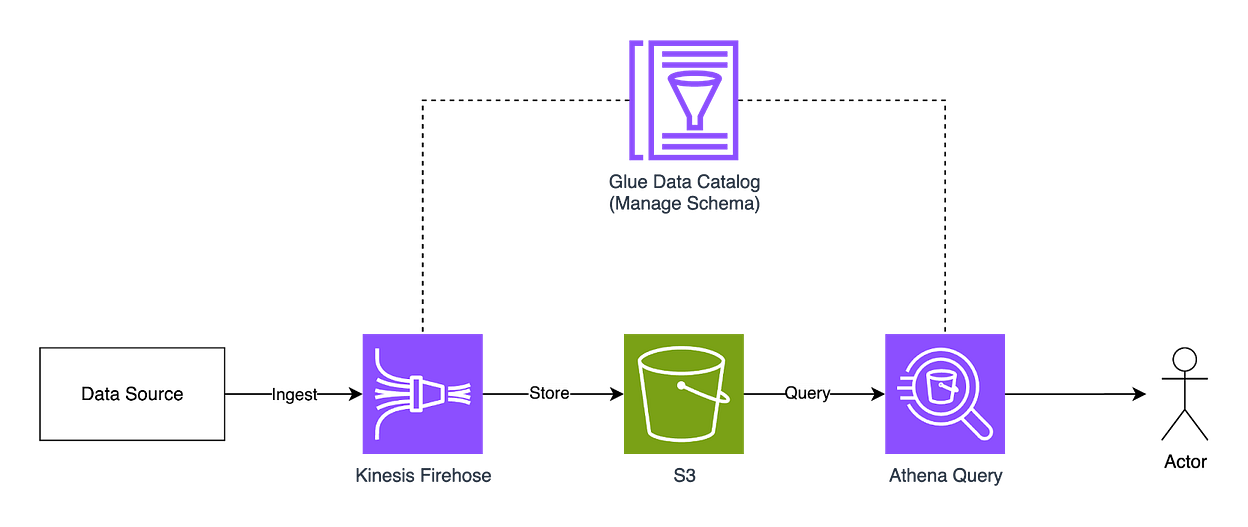
Kinesis Data Firehose handles real-time data ingestion from your applications, APIs, any or data sources. It buffers incoming data, applies conversion and compression, and delivers it to S3 in configurable batch sizes and intervals.
Amazon S3 serves as the central data repository. Firehose automatically partitions data by timestamp, creating an organized structure that optimizes query performance and reduces costs.
AWS Glue Data Catalog maintains metadata about your stored data. It discovers schemas, tracks table structures, and manages partition information.
Amazon Athena provides serverless SQL querying directly against S3 data. It uses the Glue catalog to understand data structure and location, enabling standard SQL analysis with pay-per-query pricing.
🛠️ Step-by-Step Implementations
In this guide, we’ll implement a user analytics pipeline as our example use case. We’ll track common web events like page views, clicks, and user sessions, storing data with fields such as user ID, event type, page URL, timestamp, and device information.
We’ll use Terraform to provision our AWS resources, but you can use any other Infrastructure as Code tools or even create the resources manually through the AWS Console.
Step 1: Provision Amazon S3
First, we will provision S3 bucket with optional features like versioning, server-side encryption, and public access blocking.
data "aws_region" "current" {}
data "aws_caller_identity" "current" {}

resource "aws_s3_bucket" "analytics_bucket" {
  bucket = "analytics-data-${data.aws_caller_identity.current.account_id}"
}

resource "aws_s3_bucket_versioning" "versioning" {
  bucket = aws_s3_bucket.analytics_bucket.id

  versioning_configuration {
    status = "Enabled"
  }
}

resource "aws_s3_bucket_server_side_encryption_configuration" "encryption" {
  bucket = aws_s3_bucket.analytics_bucket.bucket

  rule {
    apply_server_side_encryption_by_default {
      sse_algorithm = "AES256"
    }
  }
}

resource "aws_s3_bucket_public_access_block" "block_public" {
  bucket = aws_s3_bucket.analytics_bucket.id

  block_public_acls       = true
  block_public_policy     = true
  ignore_public_acls      = true
  restrict_public_buckets = true
}
Step 2: Provision Glue Data Catalog
Next, we’ll create the Glue database and define our data schema:
resource "aws_glue_catalog_database" "analytics_database" {
  name = "user-analytics-db"
}

resource "aws_glue_catalog_table" "user_events_table" {
  name          = "user-events"
  database_name = aws_glue_catalog_database.analytics_database.name
  table_type    = "EXTERNAL_TABLE"

  parameters = {
    "classification"                = "parquet",
    "compressionType"               = "snappy",
    "projection.enabled"            = "true",
    "projection.year.type"          = "integer",
    "projection.year.range"         = "2020,2040",
    "projection.month.type"         = "integer",
    "projection.month.range"        = "01,12",
    "projection.month.digits"       = "2",
    "projection.day.type"           = "integer",
    "projection.day.range"          = "01,31",
    "projection.day.digits"         = "2",
    "storage.location.template"     = "s3://${aws_s3_bucket.analytics_bucket.bucket}/year=$${year}/month=$${month}/day=$${day}/"
  }

  partition_keys {
    name = "year"
    type = "string"
  }

  partition_keys {
    name = "month"
    type = "string"
  }

  partition_keys {
    name = "day"
    type = "string"
  }

  storage_descriptor {
    columns {
      name = "user_id"
      type = "string"
    }

    columns {
      name = "event_type"
      type = "string"
    }

    columns {
      name = "page_url"
      type = "string"
    }

    columns {
      name = "timestamp"
      type = "timestamp"
    }

    columns {
      name = "device_type"
      type = "string"
    }

    columns {
      name = "browser"
      type = "string"
    }

    columns {
      name = "country"
      type = "string"
    }

    location      = "s3://${aws_s3_bucket.analytics_bucket.bucket}/user-events/"
    input_format  = "org.apache.hadoop.hive.ql.io.parquet.MapredParquetInputFormat"
    output_format = "org.apache.hadoop.hive.ql.io.parquet.MapredParquetOutputFormat"

    ser_de_info {
      serialization_library = "org.apache.hadoop.hive.ql.io.parquet.serde.ParquetHiveSerDe"
    }
  }
}
The storage_descriptor section defines the columns that match your actual data structure. Each column should correspond exactly to the fields your application sends through Firehose. You can customize these columns based on your specific analytics needs.
The data is partitioned using Hive format (year=2024/month=08/day=07/), which dramatically reduces compute costs by allowing Athena to scan only relevant partitions. When you query "last week's data," Athena only examines 7 daily partitions instead of your entire dataset, resulting in faster queries and lower costs since you pay per data scanned.
Notice that we use Parquet as our data format stored in S3. The reason is that Parquet is a columnar storage format optimized for analytical workloads. It provides significant compression (typically 75% smaller than JSON) and supports schema evolution, which enable us to add new columns without breaking existing queries.
Step 3: Provision Firehose
Now we’ll create the Kinesis Data Firehose delivery stream that will ingest our user events and deliver them to S3:
data "aws_kms_key" "s3" {
  key_id = "alias/aws/s3"
}

resource "aws_kinesis_firehose_delivery_stream" "user_events_stream" {
  name        = "user-events-stream"
  destination = "extended_s3"

  extended_s3_configuration {
    role_arn            = aws_iam_role.firehose_role.arn
    bucket_arn          = aws_s3_bucket.analytics_bucket.arn
    prefix              = "user-events/year=!{timestamp:yyyy}/month=!{timestamp:MM}/day=!{timestamp:dd}/"
    error_output_prefix = "errors/user-events/year=!{timestamp:yyyy}/month=!{timestamp:MM}/day=!{timestamp:dd}/!{firehose:error-output-type}/"

    buffering_size = 64
    buffering_interval = 300

    data_format_conversion_configuration {
      input_format_configuration {
        deserializer {
          hive_json_ser_de {}
        }
      }

      output_format_configuration {
        serializer {
          parquet_ser_de {}
        }
      }

      schema_configuration {
        database_name = aws_glue_catalog_database.analytics_database.name
        role_arn      = aws_iam_role.firehose_role.arn
        table_name    = aws_glue_catalog_table.user_events_table.name
      }
    }
  }
}

resource "aws_iam_role" "firehose_role" {
  name = "FirehoseDeliveryRole"

  assume_role_policy = jsonencode({
    Version = "2012-10-17"
    Statement = [
      {
        Effect = "Allow"
        Action = "sts:AssumeRole"
        Principal = {
          Service = "firehose.amazonaws.com"
        }
      }
    ]
  })
}

resource "aws_iam_role_policy" "firehose_policy" {
  name = "FirehosePolicy"
  role = aws_iam_role.firehose_role.id

  policy = jsonencode({
    Version = "2012-10-17"
    Statement = [
      {
        Effect = "Allow"
        Action = [
          "s3:AbortMultipartUpload",
          "s3:PutObject",
          "s3:PutObjectAcl",
          "s3:GetObject",
          "s3:GetBucketLocation",
          "s3:ListBucketMultipartUploads",
          "s3:ListBucket"
        ]
        Resource = [
          aws_s3_bucket.analytics_bucket.arn,
          "${aws_s3_bucket.analytics_bucket.arn}/*"
        ]
      },
      {
        Effect = "Allow"
        Action = [
          "glue:GetTable",
          "glue:GetTableVersion",
          "glue:GetTableVersions",
          "glue:GetDatabase"
        ]
        Resource = [
          "arn:aws:glue:${data.aws_region.current.name}:${data.aws_caller_identity.current.account_id}:catalog",
          aws_glue_catalog_database.analytics_database.arn,
          aws_glue_catalog_table.user_events_table.arn
        ]
      },
      {
        Effect = "Allow"
        Action = [
          "kms:Encrypt",
          "kms:Decrypt",
          "kms:GenerateDataKey",
        ]
        Resource = [
          data.aws_kms_key.s3.arn
        ]
      }
    ]
  })
}
We configure data_format_conversion_configuration to handle the data transformation: it takes JSON input from your application (using the hive_json_ser_de deserializer) and converts it to Parquet output format (using the parquet_ser_de serializer) that matches our Glue table schema.
Instead of creating a new file for every single event, Firehose batches your data based on the buffering_size (64MB) and buffering_interval (300 seconds) settings. It waits until either condition is met, then writes one consolidated file to S3. This prevents your bucket from being cluttered with thousands of tiny files, which would make queries slow and expensive.
🔍 Usage Examples
Sending data to Firehose
In this example, we’ll send data to Firehose using the Python AWS SDK, but you can use other supported programming languages. For complete SDK documentation, see the AWS Firehose Developer Guide.
import boto3
import json
from datetime import datetime

firehose_client = boto3.client('firehose', region_name='ap-southeast-1')

def send_batch_events(events):
    """Send multiple events in a single API call"""

    records = []
    for event in events:
        records.append({
            'Data': json.dumps(event) + '\n'
        })

    response = firehose_client.put_record_batch(
        DeliveryStreamName='user-events-stream',
        Records=records
    )

    return response

if __name__ == "__main__":
    sample_events = [
        {
            'user_id': 'user_12345',
            'event_type': 'page_view',
            'page_url': '/products/laptop',
            'timestamp': datetime.now().strftime('%Y-%m-%d %H:%M:%S'),
            'device_type': 'desktop',
            'browser': 'chrome',
            'country': 'US'
        },
        {
            'user_id': 'user_67890',
            'event_type': 'click',
            'page_url': '/checkout',
            'timestamp': datetime.now().strftime('%Y-%m-%d %H:%M:%S'),
            'device_type': 'mobile',
            'browser': 'safari',
            'country': 'ID'
        },
        {
            'user_id': 'user_11111',
            'event_type': 'purchase',
            'page_url': '/confirmation',
            'timestamp': datetime.now().strftime('%Y-%m-%d %H:%M:%S'),
            'device_type': 'tablet',
            'browser': 'firefox',
            'country': 'SG'
        }
    ]

    response = send_batch_events(sample_events)
    print(f"Successfully sent {len(sample_events)} events to Firehose")
    print(f"Response: {response}")
Querying data from Athena
Once your data is flowing into S3, you can query it using Amazon Athena. Open the Athena console, select the user-analytics-db database, and choose the user-events table to start analyzing your data:
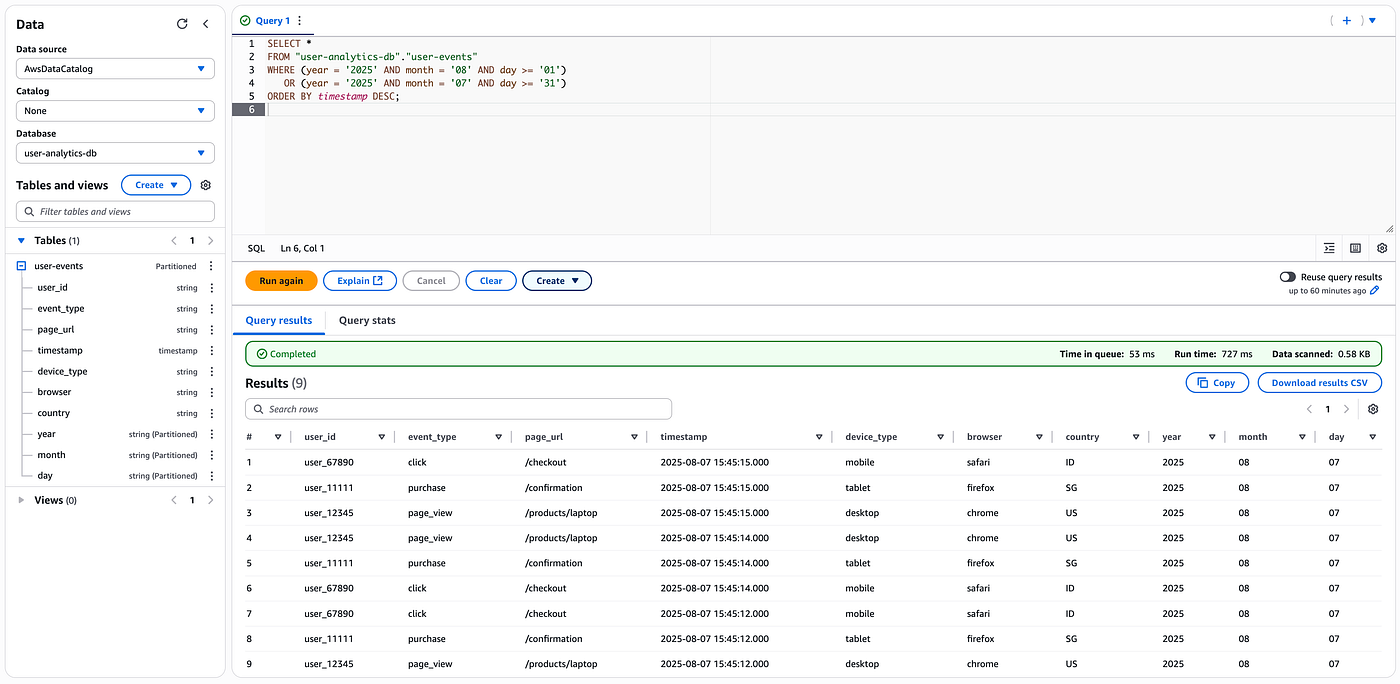
You can now use complex analytical queries to extract insights from your data, or connect Amazon QuickSight to create interactive dashboards and visualizations for non-technical users.
💸 Cost Breakdown
Cost-Per-Services
This serverless architecture is designed for cost efficiency, with most services using pay-per-use pricing:
Amazon S3 (Standard Tier)
Storage: ~$0.023 per GB/month
Kinesis Data Firehose
Data Ingested: $0.029 per GB
AWS Glue Data Catalog
Storage: $1 per 100,000 objects/month
Requests: $1 per 1 million requests
Amazon Athena
Data Scanned: $5 per TB of data scanned
Total Monthly Cost Example
For a typical use case processing 100GB of user events monthly with moderate querying, your costs would be:
S3 Storage: 100GB × $0.023 = ~$2.30/month
Firehose: 100GB × $0.029 = ~$2.90/month
AWS Glue Data Catalog: Free (under 1M objects)
Athena: ~25GB scanned × $0.005 = ~$0.125/month
Total: ~$5.35/month
📜 Conclusion
This serverless ETL pipeline provides a foundation for near real-time analytics without the operational overhead of managing infrastructure. The combination of Firehose, S3, Glue Data Catalog, and Athena creates a solution that scales automatically with your data volume.
For more advanced use cases, you can add another layer to programmatically transform your source data in Firehose using AWS Lambda functions. See the Data Transformation documentation for implementation details.
You can also extends it with additional AWS services like QuickSight for visualization, EventBridge for event-driven processing, or Step Functions for complex workflows.
You can find the complete Terraform code for this implementation in this GitHub repository.